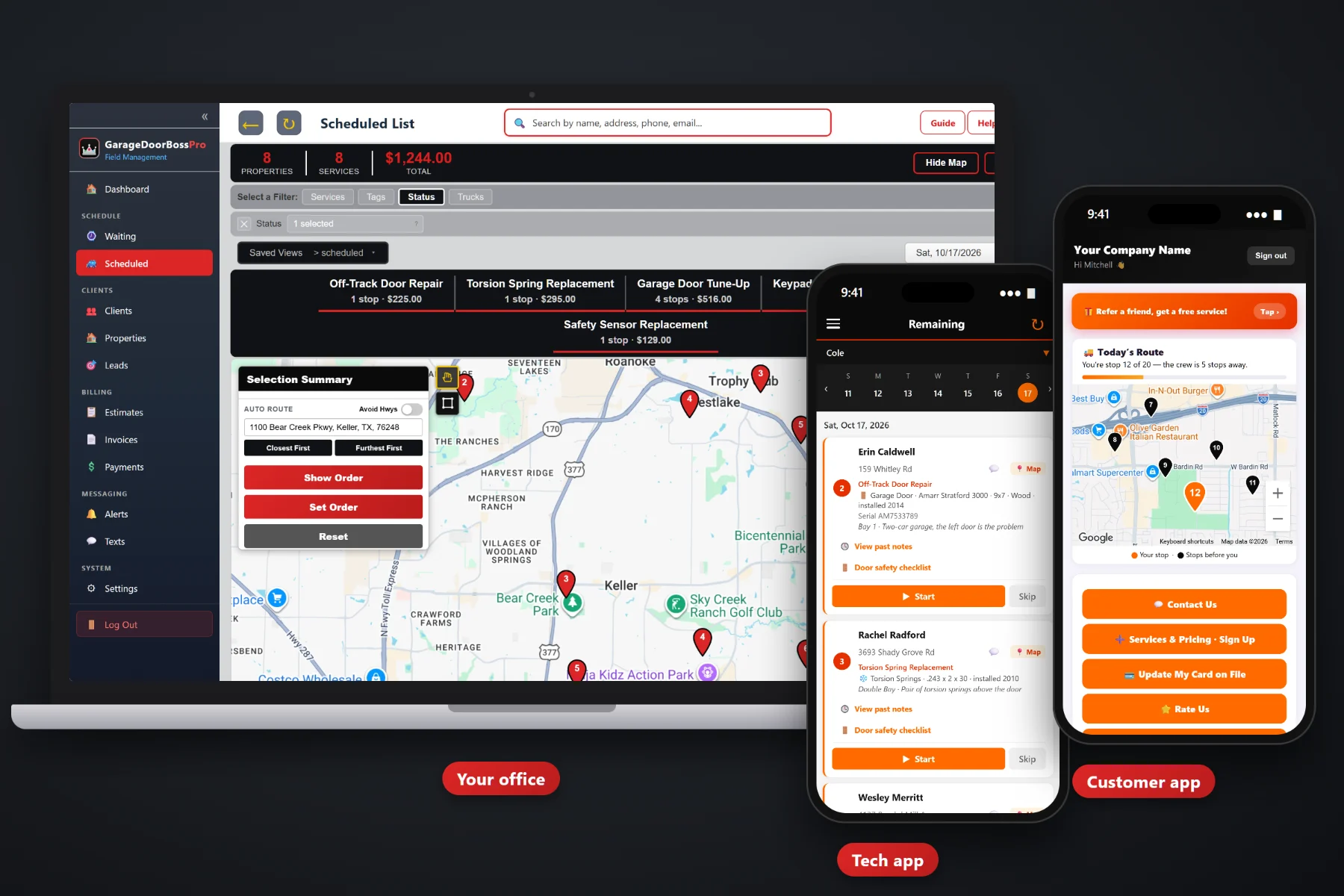
A garage door schedule never holds still. A broken spring calls in at 7:40 with a car stuck inside, an install needs the whole afternoon, and forty yearly tune-ups are coming due across town. GarageDoorBossPro puts every job on a dispatch board by day and by van, auto-routes Closest First or Furthest First from the shop, keeps tune-ups on a Waiting List map, and sends the homeowner on-the-way and arrived texts as the tech works the route.
Plans start at $59/month, and the dispatch board, routing, Waiting List and customer texts come with every plan. To see how scheduling fits with equipment on the house, the tech app, estimates and billing, start at GarageDoorBossPro and then dig into the scheduling side here.
Every job for the day, split by van. Move a spring call from the install van to the repair van in a couple of clicks.
Closest First or Furthest First, then nudge the order by hand when a homeowner can only do mornings.
Yearly tune-ups and commercial maintenance land on a map when they come due, colored not due, due now and overdue.
A broken spring or a car stuck in the garage goes straight onto today's board for the van that can get there.
Night-before reminders, on-the-way and arrived texts. Customers pick the alerts they want, and replies come to the office.
Every van on the office map, so the office knows who is closest when the next emergency call comes in.
Most garage door companies run a repair van that chases springs, cables and off-track doors, and an install van that spends half a day at one house. GarageDoorBossPro shows both on one board, filtered by van, with each route in order from the shop. When the phone rings, the office can see which van has room and how far it is from the call.
Whoever answers the phone at a garage door company is also the dispatcher. GarageDoorBossPro keeps the day to a few screens: the board, the Waiting List map and the office map with the vans on it. No whiteboard, no spreadsheet, no calling a tech to ask where he is.
Add employees with personal PINs, assign them to vans, and bring in customers by CSV import. Imported addresses are placed on the map automatically.
Phone calls, website requests, customer app requests, approved estimates and tune-ups that came due all end up waiting to be scheduled.
Put jobs on a day and a van, auto-route Closest First or Furthest First, then adjust the order by hand.
Each tech sees the same order on the phone, and customers get on-the-way and arrived texts as the van moves.
Lawn crews and cleaners can plan a week ahead. Garage door companies plan a day, then rebuild it by nine. A schedule that cannot take a same-day call without falling apart is not much of a schedule.
Ask anyone who has dispatched for a garage door company and the story is the same: a whiteboard with two columns, a phone that will not stop ringing after the first cold night, and a homeowner whose car is stuck behind a door that will not lift. Which van is closest? Which van has room? Which van has the right parts on it? And did anyone tell the three customers who just got bumped?
Meanwhile the yearly tune-ups everyone agreed to last spring quietly go unscheduled, because nobody had time to look them up. When every job and every due visit is on one board and one map, the office can answer those questions while the customer is still on the phone.
GarageDoorBossPro keeps the call, the door, the van and the customer in one place, from the first ring to the paid invoice.
Every tool here exists to get the right van to the right door, in an order that makes sense, with the customer knowing when to expect it.
The Scheduled List shows jobs by day, filtered by van, with each route in order.
Closest First or Furthest First from the shop, in one click.
Move any stop up or down when a customer needs a time window.
Keep spring and off-track calls on one van and installs and tune-ups on another.
Every visit that came due plus new requests, pinned not due yet, due now or overdue past a 7-day grace.
Yearly tune-ups at 365 days, commercial maintenance at 90 days or whatever you set.
Dock doors, rolling doors and sectional doors on property manager and commercial accounts.
Door size, opener, springs, bay and access notes show on the job before the van is sent.
Night-before, when-they're-next and arrived alerts, plus automatic on-the-way texts.
In the customer app: "You're stop 12 of 20 — the tech is 5 stops away."
Vans show on the office map, so the next emergency goes to whoever is closest.
Print the day for a van when a paper copy on the dash still helps.
Save the board setups you check every morning and open them in one click.
Website request forms, customer app requests and approved estimates become jobs to schedule.
iPhone and Android in the browser. The tech sees the same route order as the board.
Start $59, Pro $89 and Crew $199 per month, with scheduling on every plan.
Sell a yearly tune-up plan and GarageDoorBossPro brings it back 365 days after the last visit. Commercial door maintenance can come back every 90 days. Every visit that comes due lands on the Waiting List, a live map and list colored by how due it is, right next to new service requests. Pick a part of town, grab the pins, and fill a day. For the full walkthrough, read Garage Door Scheduling Software: The Complete Guide to Scheduling and Dispatching a Garage Door Company.
A garage door job usually needs someone home, or at least a keypad code and a clear bay. Night-before reminders, a when-you're-next alert and an arrived text tell the homeowner exactly when to expect the tech, and the on-the-way text goes out on its own when the tech heads over. The customer app shows their place in line on a live map. Replies come to the office through two-way texting.
Pick the plan that fits your shop. Every plan starts with a 14-day free trial and no credit card.
Compare plans on the pricing page.
Add the job to today, put it on the van that can get there, and move it up the route order. Crew GPS on the office map shows where each van is, and the tech sees the new order on the phone. The customers who moved down the list still get their on-the-way and arrived texts when the tech actually heads their way.
On the dispatch board, pick a van and a day and auto-route Closest First or Furthest First from the shop. You can then move any stop by hand, for example to put a homeowner who can only do mornings near the top.
Yes. Employees are assigned to vans, and the board filters by van. A common setup is one van on repairs and emergency spring calls and one van on installs and tune-ups.
Set the tune-up plan to 365 minimum days between visits. When a house comes due it shows on the Waiting List map, colored due now, or overdue once it passes a 7-day grace. Pick the pins in one area and put them on a day.
Customers choose their alerts: the night before, when they are next, and when the tech arrives. The tech app also sends automatic on-the-way and arrived texts, and the customer app shows a live map of their place on the route.
Start is $59/month, Pro is $89/month, and Crew is $199/month. Scheduling and dispatch are on every plan, and every plan starts with a 14-day free trial with no credit card.
Scheduling is one piece of how GarageDoorBossPro runs a garage door company. For equipment saved on the house, the door safety inspection checklist, estimates, commercial accounts and billing, see the full GarageDoorBossPro platform overview.
Practical reading on the dispatch board, auto-routing, same-day spring and stuck-door calls, repair and install vans, the Waiting List map, tune-ups, commercial doors, customer texts, crew GPS, route sheets and busy days.
A dispatch board by day and van, auto-routing from the shop, a Waiting List map for tune-ups and automatic customer texts. Try GarageDoorBossPro free for 14 days.