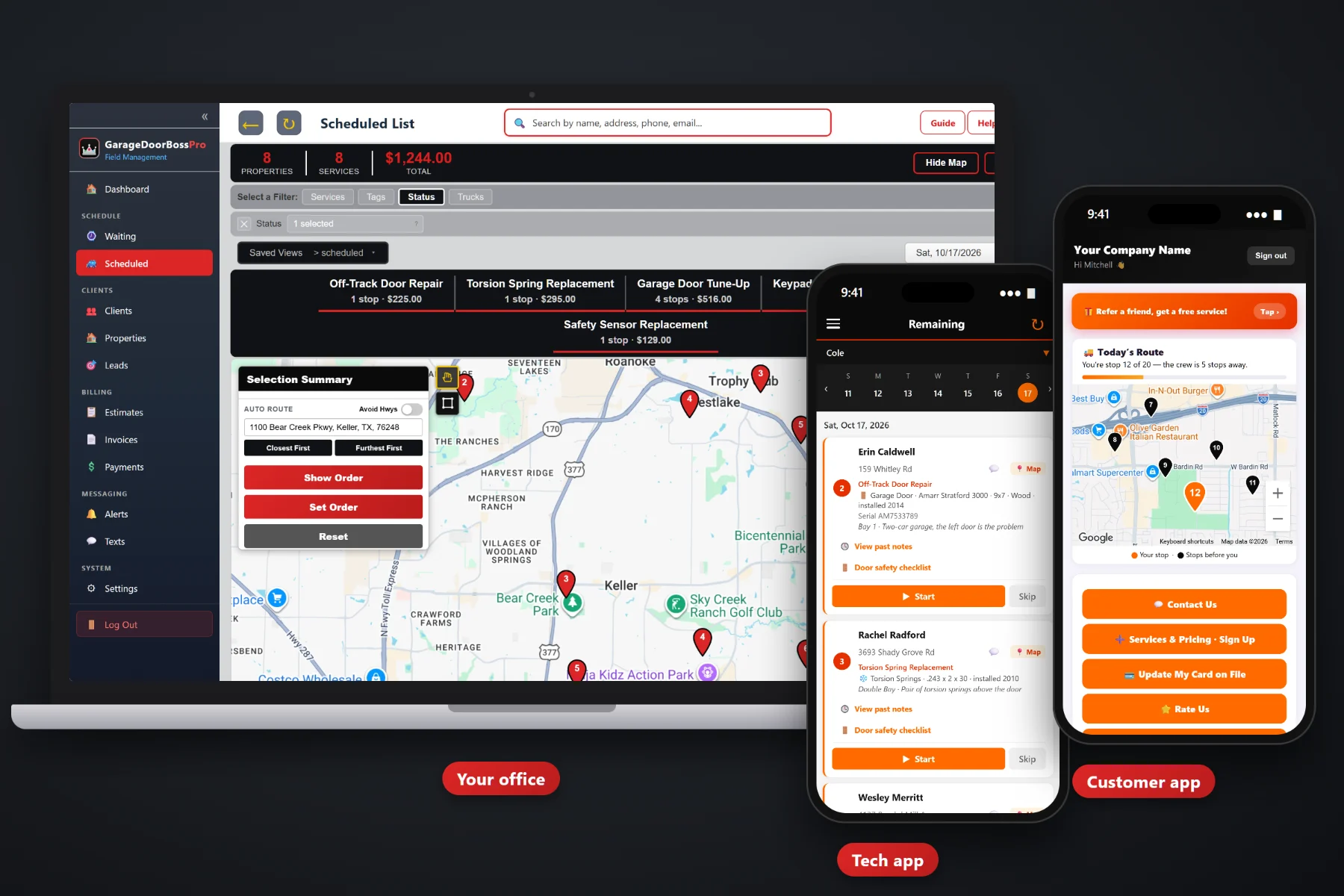
A commercial account is not one door. It is a warehouse with eight dock doors, a storage facility with rows of roll-ups, a property manager with forty townhomes, or an auto shop that loses money every hour a bay door won't open. GarageDoorBossPro keeps a door record for every opening at every address, brings maintenance due every 90 days onto a live map, puts access notes and door details on the tech's phone, prints inspection reports for facility managers and sends one monthly statement that covers every address.
Plans start at $59/month, and commercial accounts work on every plan: many addresses under one client, door records on each address, recurring maintenance, inspection reports and monthly account billing. To see how commercial work fits with residential repairs, installs and tune-up plans, start at GarageDoorBossPro and then come back here for the commercial side.
A property manager, HOA or warehouse company is one client with every building listed under it, each with its own doors and notes.
Commercial rolling doors, sectional doors, openers and gate openers saved with brand, model, serial, size, year and bay.
Set a door maintenance plan at 90 days and every visit lands on the Waiting List map when it is due.
The tech works the door safety checklist on the phone, and the office prints a report the facility manager can file.
Photos from the tech's phone stay on the job, so the manager who never saw the dock can see the work.
Accounts set to Monthly get one statement covering every address, with each line labeled by the address.
A warehouse with eight dock doors is a bad place to guess which one is the problem. GarageDoorBossPro keeps every door on the address with its bay and details, keeps access notes like where to get the key and who signs off at the dock office, and shows all of it on the tech's job card.
Commercial accounts usually arrive as a spreadsheet of addresses and a phone call about one bad door. GarageDoorBossPro turns that into one client, every building on the map, a door record at each one and a maintenance cycle that keeps the account coming back.
CSV import brings in the manager's addresses, and each one is placed on the map automatically under the one client.
On the first visit the tech adds each door at each building: type, size, brand, model, serial, year and bay.
Put door maintenance at every 90 days, or whatever the account agreed to, and visits come due on the Waiting List.
Set the account to Monthly and every job at every address rolls into one statement, each line labeled with the address.
A homeowner has one or two doors and pays at the end of the job. A commercial client has many buildings, many doors, a manager who is never on site and an accounts payable office that wants one bill. Running that out of a notes field and a pile of separate invoices is where commercial work goes sideways.
Ask any door company that has taken on a property manager and you will hear the same story: a list of addresses in an email, a tech standing at the wrong building, a dock door described as “the one on the left” and a pile of separate invoices the manager's office could not match to properties. Nobody remembered when the last maintenance visit was. Nobody could say which doors were flagged on the last inspection.
That information belongs on the building and the door, not in an inbox. When it lives there, any tech can run any commercial stop and the manager gets the same clear paperwork every time.
GarageDoorBossPro keeps the account, the buildings, the doors and the billing in one place, from the first property list to the paid monthly statement.
Every tool here exists to keep many doors at many addresses organized, serviced on time and billed the way commercial clients want to pay.
Property managers, HOAs and multi-site businesses keep every building under one client.
Rolling doors, sectional doors, openers and gate openers with brand, model, serial, size, year and bay.
Bay 1, Bay 2, shop or commercial dock on each door, so the tech goes straight to the right one.
Recurring work set by minimum days between visits, so maintenance comes due on its own.
Every due visit on a live map: not due yet, due now and overdue past a 7-day grace.
Add an after-hours call to the board, assign it to a van and the tech sees the door record on the way.
Keys, dock office check-in, site contacts and hours stored on the address and shown on the card.
Springs, cables, rollers, tracks, balance, sensors, opener force and limits, with condition and recommendations.
The office prints a Garage Door Safety Inspection report from the job for the facility manager.
Taken in the tech app and saved with the job.
Built from your service list, approved online by the manager and turned into a scheduled job.
One statement each month covering every address, each line labeled with the address.
Text site contacts and managers from the office, with automatic alerts by text and email.
Bring in a property list, and imported addresses are placed on the map automatically.
Commercial stops and residential repairs, installs and tune-ups share one schedule.
Start $59, Pro $89 and Crew $199 per month, with commercial accounts on every plan.
Most door companies don't run a separate commercial division. They have one van on repairs and emergency spring calls and one on installs, tune-ups and maintenance. GarageDoorBossPro puts 90-day commercial visits on the same Waiting List as yearly residential tune-ups, so the office assigns them to a van and a day, auto-routes Closest First or Furthest First from the shop, and prints route sheets. For a full walkthrough of commercial accounts, read Commercial Garage Door Software: The Complete Guide for Door Companies Serving Businesses and Property Managers.
The person who pays a commercial bill is often not the person standing at the dock. GarageDoorBossPro handles both. Site contacts can get night-before, on-the-way and arrived alerts, and the office texts back and forth with them from one inbox. Managers get inspection reports, photos on the job, estimates they approve online, and one monthly statement with every address on its own line. Invoices, online payment and the card on file are in the customer app.
Pick the plan that fits your operation. Every plan starts with a 14-day free trial and no credit card.
Compare plans on the pricing page.
Yes. A property manager, HOA, storage company or warehouse operator is one client with every address listed under it. Each address keeps its own doors, access notes and job history, and each one shows on the map.
Every address keeps a list of its doors and hardware: commercial rolling doors, commercial sectional doors, openers, gate openers and more, each with brand, model #, serial #, year installed, size, material and a bay label such as Bay 2 or commercial dock. The tech sees the list on the job card, and changes on a job flow back to the address.
Yes. Recurring work is set by minimum days between visits. Set a commercial door maintenance plan at 90 days, and each visit comes due on the Waiting List map when the time is up, colored not due yet, due now or overdue past a 7-day grace.
The tech works the door safety inspection checklist on the phone, records a condition and written recommendations, and takes before-and-after photos. The office can print a Garage Door Safety Inspection report from the job and send the invoice or include the work on the monthly statement.
Yes. Set the account to Monthly and it gets one statement each month covering every address, with each line labeled with the address it belongs to.
Start is $59/month, Pro is $89/month, and Crew is $199/month. Commercial accounts and monthly billing work on every plan, and every plan starts with a 14-day free trial with no credit card.
Commercial accounts are one piece of how GarageDoorBossPro runs a garage door company. For residential repairs, installs, tune-up plans, the tech app and billing, see the full GarageDoorBossPro platform overview.
Practical reading on warehouses, loading docks, storage facilities, auto shops, property managers and HOAs, door records per building, 90-day maintenance, emergency calls, inspection reports, monthly statements and replacement estimates.
Door records per building, maintenance that comes due on its own, inspection reports, photos and one monthly statement for every address. Try GarageDoorBossPro free for 14 days.