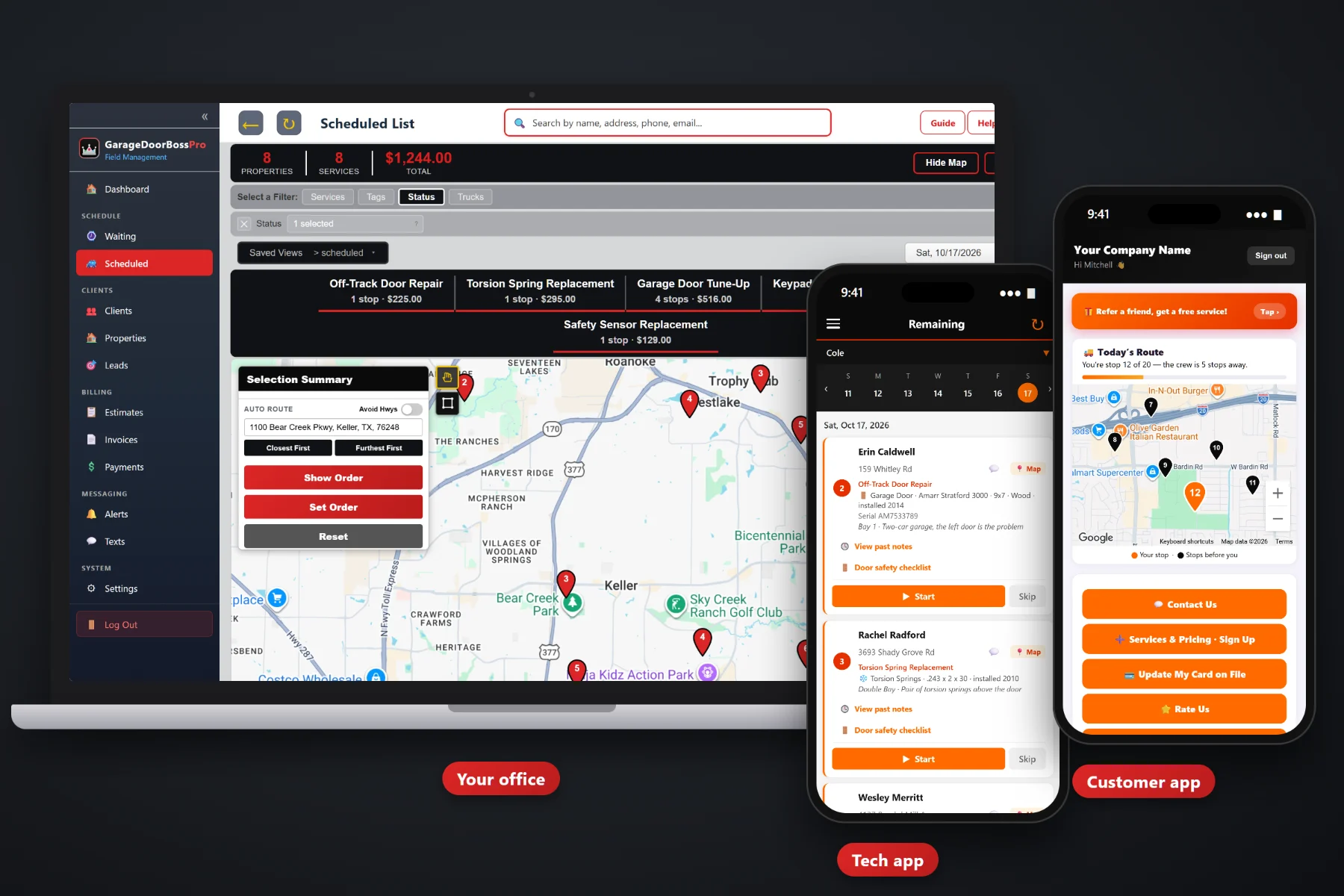
A garage door quote is rarely one line. It is a service call, a pair of springs, maybe new rollers, maybe an opener, and sometimes a whole new 16x7 insulated door. GarageDoorBossPro builds estimates from the services and prices you set up, keeps the door and opener details on the estimate so they carry onto the job, lets the customer approve online, and turns the approved estimate into a scheduled job. Follow-up emails chase the quotes nobody answered.
Plans start at $59/month, and estimates are part of every plan. Quotes, online approval, follow-up emails and the jump from approved estimate to scheduled job come with the platform, not as an add-on. To see how quoting fits with dispatch, the tech app, tune-up plans and billing, start at GarageDoorBossPro and then dig into the quoting side here.
Service call, torsion springs, cables, rollers, opener installs, new doors. You name the services and set the prices, and every estimate pulls from them.
Door size, material, opener drive and bay can be filled in on the estimate, so the job that comes out of it already knows what is going in.
The customer reads the estimate and approves it online. No faxed signature, no “did you get my voicemail.”
An approved estimate becomes the scheduled job, with the same line items and details. Nobody retypes it.
Estimate follow-up emails go to customers who have not answered, so open quotes do not quietly die in an inbox.
Save the quotes you write every week, like a spring pair with rollers or an opener swap, and start the next one from the template.
A homeowner with a broken spring wants a number. A homeowner with a twenty-year-old door wants choices. GarageDoorBossPro lets you put each option on its own line, from your own prices, with the door and opener details written right on the estimate. When the customer approves, the job carries those details to the tech's phone.
Garage door owners write quotes between calls, in the van, at the kitchen table. GarageDoorBossPro keeps it short: pick the client, pick the services, add the door details, send it. The approval, the follow-up and the job all come from that one estimate.
Service call, spring replacement, cables, rollers, off-track repair, opener install, new door install, after-hours emergency. Your names, your prices.
Add line items from the list, fill in the door and opener details, and write notes on size, material or insulation where they matter.
Send it, and the customer approves online. Follow-up emails go out to the ones who have not answered yet.
The approved estimate becomes a scheduled job on the dispatch board, with the line items and door details already on it.
Most garage door quotes start as a number scribbled on a carbon pad or typed into a text message. The customer says they will think about it, and the quote is gone. When they call back, nobody remembers which door, which springs or which opener was quoted.
Ask any garage door owner where the quotes go and you will hear the same story: a price given over the phone that did not match the one the tech gave in the driveway, a new-door quote written on the back of an invoice, and an opener install that got approved by text with nobody sure which opener the customer actually said yes to. Whether the haul-away was included. Whether it was one spring or the pair.
That belongs on a written estimate tied to the client and the address. When the quote, the approval and the job are the same record, the tech installs what the customer approved and the invoice matches the quote.
GarageDoorBossPro keeps the quote, the door, the address and the customer in one place, from the first phone call to the paid invoice.
Every tool here exists to get a clear quote in front of the customer faster, get a yes on record, and get the right parts and the right tech to the right driveway.
Build estimates from the services you set up, priced the way you price them.
Torsion and extension spring replacement, cables and drums, rollers and off-track repair as clear lines.
Opener repair and install, with HP and drive type written on the estimate.
Door size, material and insulation on the estimate as line items and notes.
Repair next to replace, or good, better and best, each as its own line item.
Door and opener details filled in on the estimate carry onto the job and the house.
Customers approve the estimate online, and the approval is on record.
An approved estimate becomes the scheduled job, ready for the dispatch board.
Estimate follow-up emails go to customers who have not answered.
Save common quotes and start new ones from them.
The door safety inspection on the tech app gives the office what it needs to quote the repairs.
Quote requests from your website land in Form Responses, ready to become an estimate.
Answer quote questions by text from the office, with the thread kept on the client.
Quote rolling doors, sectional doors and many addresses under one client.
The job carries the estimate's line items through to the invoice, with sales tax.
Start $59, Pro $89 and Crew $199 per month, with estimates on every plan.
Quotes start from a phone call, a website request or a tech's note from the field. The office builds the estimate, the customer approves it online, and the approved estimate becomes a job on the dispatch board. Put it on the install van's day, auto-route Closest First or Furthest First from the shop, and the tech sees the door size, material and opener details on the job card. For a full walkthrough of quoting, read Garage Door Estimate Software: The Complete Guide to Quoting Repairs, Springs, Openers and New Doors.
A homeowner picking a new door or an opener wants to look at the options with their spouse after dinner, not decide in the driveway. A written estimate with each option on its own line lets them do that, and online approval means a yes at 9pm still turns into a job. Questions come back to the office through two-way texting. After the work, the invoice, card on file and online payment are in the customer app, along with a yearly tune-up plan they can sign up for.
Pick the plan that fits your operation. Every plan starts with a 14-day free trial and no credit card.
Compare plans on the pricing page.
From your own service list. You set up the services you sell, such as a service call, torsion or extension spring replacement, cables, rollers, off-track repair, opener repair and install, new door install, panel replacement, sensors, keypads and remotes, weatherstripping, commercial door repair and after-hours emergency calls, and you set the price on each. Estimates are built from those line items.
Yes. Add the new door install as a line item and write the size, material and insulation on the estimate as details or notes, such as 16x7, insulated steel. GarageDoorBossPro does not include a manufacturer catalog, so you price doors the way you already do and put that price on the line.
You send the estimate and the customer approves it online. If they have not answered, estimate follow-up emails remind them. Once approved, the estimate becomes the scheduled job.
Yes. Equipment details filled in on the estimate carry onto the job, so the tech sees the door size, material, opener drive and bay on the job card. Changes made on the job flow back to the equipment saved on the house.
Put each option on its own line item, such as repair the current door next to a new door install, or three opener choices at different prices. The customer sees every option on the same estimate.
Start is $59/month, Pro is $89/month, and Crew is $199/month. Estimates are on every plan, and every plan starts with a 14-day free trial with no credit card.
Estimates are one piece of how GarageDoorBossPro runs a garage door company. For dispatch, the tech app, the door safety inspection, tune-up plans, commercial accounts and billing, see the full GarageDoorBossPro platform overview.
Practical reading on service lists and pricing, spring, opener and new door quotes, repair-or-replace options, online approval, follow-up emails, phone and photo quotes, inspection quotes, and commercial, property manager and HOA estimates.
Estimates from your own service list, door details that carry onto the job, online approval, follow-up emails and approved quotes that become scheduled jobs. Try GarageDoorBossPro free for 14 days.