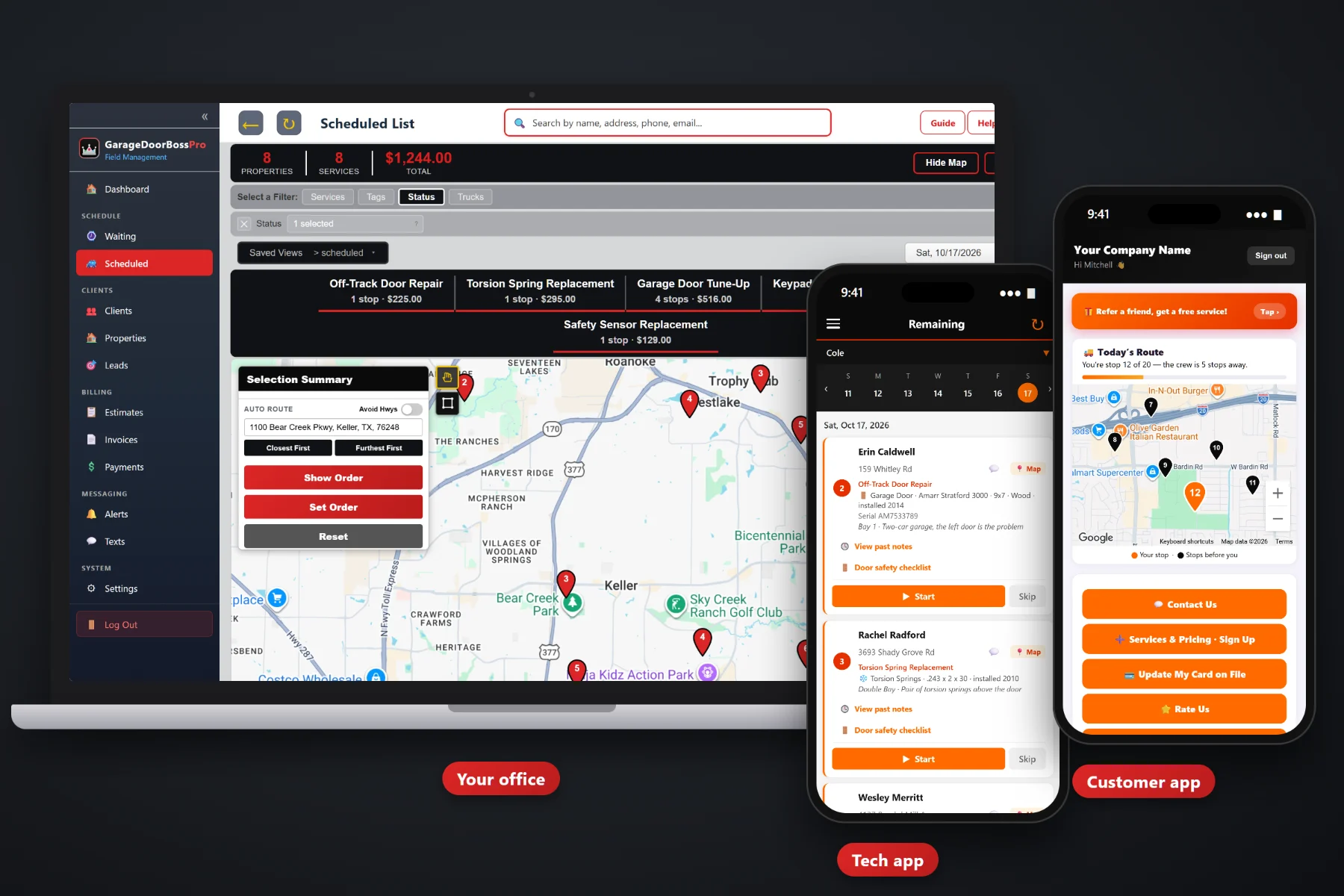
A garage door call is never just an address. It is a door of a certain size and material, an opener of a certain model, a pair of springs, a bay that is the problem and a homeowner who wants it fixed today. GarageDoorBossPro saves every door, opener and spring on the house, puts it on the tech's phone with a door safety inspection checklist, brings yearly tune-ups back on a Waiting List map, routes your vans and bills by card on file or one monthly statement.
Plans start at $59/month and every plan includes the office, the tech app and the customer app. Equipment records, the door safety inspection, tune-up plans, dispatch, estimates, texting and billing all come with the platform. For the big picture, start at GarageDoorBossPro, then read on here for what garage door software does day to day.
Doors, openers, springs, cables, sensors, keypads and remotes, each with brand, model, serial, year, size and bay.
A checklist on the tech app, readings and a condition, then a printed Garage Door Safety Inspection report for the homeowner.
Yearly tune-up plans and commercial maintenance land on the Waiting List map when they come due, colored by how late they are.
Jobs by day and van, auto-route Closest First or Furthest First from the shop, saved views and printed route sheets.
Build estimates from your own service list. The customer approves online and the estimate becomes the scheduled job.
Card on file charged at completion, online payment in the customer app, and one monthly statement for property managers.
The first visit to a house is the only time anybody should have to look up the opener model or measure the door. GarageDoorBossPro keeps every piece of equipment on the property record. The next job at that house fills in from it with the From House picker, and anything the tech changes on the job flows back to the house.
You run vans, not an IT department. GarageDoorBossPro runs in the browser on the office computer and on the iPhones and Android phones your techs already carry. Bring your customer list in with a CSV import, add your services and vans, and run tomorrow's calls from it.
Service call, spring replacement, cables, rollers, opener install, new door, tune-up plan. Then your vans and techs with personal PINs.
CSV import brings in clients and addresses, and every imported address is placed on the map automatically.
Estimates become jobs, tune-ups come due on the Waiting List, and the dispatch board puts each van's day in route order.
Techs open the card, check the door, take photos and tap Complete. The invoice is created and the card on file can be charged.
Most field-service tools give a job an address and a notes box. A garage door job is a door size, a material, an opener model, a pair of springs and a bay. Software that only knows the address leaves the most useful part of every call on a paper ticket.
Ask any garage door owner how the week really runs and you will hear the same story: a whiteboard of calls that changed three times before lunch, a carbon-copy ticket with the opener model written in pencil, and a tech standing in a garage calling the office to ask what size door the house has. Whether the customer is on a tune-up plan. Which of the two doors is the broken one. Whether the property manager wanted the bill sent to the unit or to the office.
That information belongs on the house, not on a clipboard or in one tech's memory. When it shows up on the phone, any tech can take any call and the office stops reading model numbers over the phone.
GarageDoorBossPro keeps the customer, the house, the equipment, the job and the invoice in one place, from the first phone call to the paid bill.
Every tool here exists to get a garage door company through a week of repairs, installs and tune-ups with fewer phone calls, fewer repeat trips and fewer unpaid invoices.
Every door and piece of hardware saved on the property, with brand, model #, serial #, year installed, size, material and bay.
New jobs fill in from the house record, and changes on the job flow back to the house.
Springs, cables, rollers, tracks, balance, auto-reverse, photo-eyes, opener force and limits and more, checked on the tech app.
Readings, a condition and written recommendations on a Garage Door Safety Inspection report for the homeowner.
Every tune-up and maintenance visit that came due, plus new requests, on a live map colored not due, due now and overdue.
Jobs by day, filtered by van, auto-routed from the shop, with saved views and printed route sheets.
Company login plus personal PIN, the day in route order, navigation, equipment and access notes, Start / Skip / Complete.
Photos taken on the job stay with the job and the house.
A live route map, service requests, tune-up plan sign-up, invoices, payment and card updates.
Built from your service list, approved online by the customer, converted into the scheduled job.
Text customers from the office, plus automatic reminders, on-the-way and arrived alerts.
Charge on completion or on a schedule, with past-due follow-up for anything still open.
Property managers, HOAs and commercial accounts get one statement a month, every line labeled with its address.
Bring in your customers and addresses. Imported addresses are placed on the map automatically.
Tech locations show on the office map, so you know which van is closest to a new call.
Start $59, Pro $89 and Crew $199 per month, with a 14-day free trial and no credit card.
Most garage door companies split the day the same way. One van stays loose for broken springs, off-track doors and openers that quit, and another works the scheduled installs and tune-ups. GarageDoorBossPro shows every job on the dispatch board by day and van, auto-routes Closest First or Furthest First from the shop, and lets you drop an emergency call into the right spot in the order. The tech's phone shows the same order the board does. For a full walkthrough, read Garage Door Software: The Complete Guide for Garage Door Companies.
A homeowner with a door stuck shut wants two things: to know when you will get there and to know what you found. Automatic reminders the night before, on-the-way and arrived texts, and a live map in the customer app take care of the first. The door safety inspection report, the invoice with every line item, and online payment take care of the second. Customers can also sign up for a yearly tune-up plan, request service and update their card on their own.
Pick the plan that fits your operation. Every plan starts with a 14-day free trial and no credit card.
Compare plans on the pricing page.
It is the system a garage door company runs on: customers and their addresses, the doors, openers and springs at each house, estimates, scheduling and dispatch, the tech app, customer texts and billing. GarageDoorBossPro keeps all of it in one place instead of on paper tickets, a whiteboard and a spreadsheet.
Garage doors, garage door openers, torsion springs, extension springs, cables & drums, keypads, remotes, safety sensors, commercial rolling doors, commercial sectional doors and gate openers. Each can have a brand, model #, serial #, year installed, size, drive or material, bay and access notes.
Yes. A tune-up plan is set by minimum days between visits, such as 365 for yearly. When a visit comes due it shows up on the Waiting List map, and the tech runs the door safety inspection checklist on the job. The office can print a Garage Door Safety Inspection report for the homeowner.
Yes. Set the account to Monthly and it gets one statement each month covering every address, with each line labeled with the address it belongs to.
No app store download. The tech app runs in the browser on iPhone and Android and can be installed to the home screen. Techs sign in with your company login and their own personal PIN.
Start is $59/month, Pro is $89/month, and Crew is $199/month. Every plan starts with a 14-day free trial with no credit card, and you can click around a fully-stocked sample garage door company in the live demo first.
This page covers what garage door software does. For the tech app, scheduling, estimates, invoicing, maintenance plans and commercial accounts in more depth, see the full GarageDoorBossPro platform overview.
Practical reading on moving off paper, equipment on the house, the door safety inspection, tune-up plans, dispatch, the tech and customer apps, estimates, billing, monthly accounts, texting, setup, CSV import and choosing software.
Every door, opener and spring saved on the house, a door safety inspection on every tech's phone, tune-ups that come due on their own and invoices that get paid. Try GarageDoorBossPro free for 14 days.